



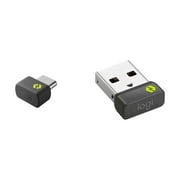
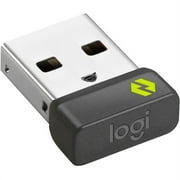
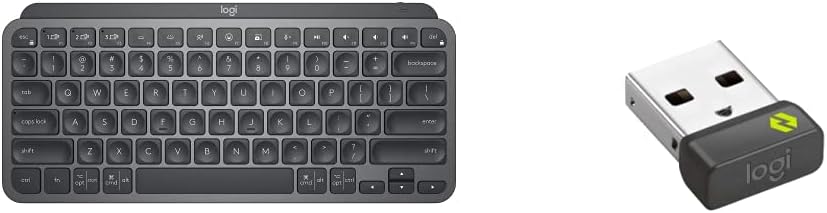
Logitech Bolt USB-A Receiver | Secure wireless connection up to 10 meters (33 feet) range, connects up to 6 compatible wireless devices, plug-and-play
Connect up to 6 Logi Bolt wireless keyboards and mice to one computer with a single Logi Bolt receiver and forget the hassle of multiple USB receivers.
Logitech Bolt USB-A Receiver | Secure wireless connection up to 10 meters (33 feet) range, connects up to 6 compatible wireless devices, plug-and-play
Vare #: 220463164

Logitech Bolt USB-A Receiver | Secure wireless connection up to 10 meters (33 feet) range, connects up to 6 compatible wireless devices, plug-and-play

Vare #: 220463164
Ikke på lager
US Importeret fra USA butik
Vores bedste logistikpartnere
  • fedex
  • dhl
Connect up to 6 Logi Bolt wireless keyboards and mice to one computer with a single Logi Bolt receiver and forget the hassle of multiple USB receivers.
U-Pleje garanti:
Ingen
Vælg en plan
fast shipping

Hurtig
levering

free return

Gratis
returnering*

Sikker emballering

Sikker emballering

100 % originale produkter'

100 % originale produkter'

pci-dss

PCI DSS Compliance

iso certified

ISO 27001 Certified


paypal payment
visa payment
mastercard payment
Note: Step Down Voltage Transformer required for using electronics products of US store (110-120). Recommended power converters Køb nu.

Hvad der skiller sig ud

Universal Compatibility
The Logitech Bolt USB-A receiver offers seamless compatibility with a wide range of Logitech devices, ensuring users can connect multiple peripherals effortlessly without the hassle of constant reconfiguration.
Secure Connection
Using advanced encryption technology, the Logitech Bolt ensures a highly secure wireless connection, significantly reducing the risk of interference and unauthorized access, ideal for sensitive work environments.
Long Range
Featuring an extended wireless range, this receiver allows reliable connectivity up to 10 meters, providing users the freedom to work or play remotely without the limitations of traditional wired connections.

Produktdetaljer

Shop Logitech Bolt USB-A Receiver | Secure wireless connection up to 10 meters (33 feet) range, connects up to 6 compatible wireless devices, plug-and-play online at a best price in Greenland. B0F9DWFSHP
Compatible DevicesDesktop, Headphone, Keyboard, Laptop, Mouse
Connector TypeUSB 2.0
Number of Ports6
Power Plug TypeNo Plug
BrandLogitech
Model Number956-000007
UPC097855168283
Global Trade Identification Number00097855168283
ManufacturerLogitech
External Testing CertificationNu00e3o aplicu00e1vel
Built-In MediaLogi Bolt USB-A Receiver
Item Length0.73 inches (1.9 cm)
Mfr Part Number956-000007
Item Dimensions1.08 x 0.65 x 0.36 inches (2.7 x 1.7 x 0.9 cm)
Item Weight2 g
Package Quantity1
Unit Count1 Count
Number of Items1
ColorGraphite
Item dimensions L x W x H1.08 x 0.65 x 0.36 inches (2.7 x 1.7 x 0.9 cm)

Hvem bør købe?

Suitable For
  • Office Workers

    Ideal for users with Logitech wireless peripherals, offering a stable link and seamless connectivity in a busy office environment.

  • Frequent Travelers

    Compact and easy to carry, it simplifies connecting devices on the go, especially for business presentations and remote work.

  • Multi-Device Users

    Perfect for users managing multiple Logitech devices, allowing quick switching and improved productivity without tangled cords.

Not Suitable For
  • Budget Shoppers

    Those looking for inexpensive options might find other alternatives that offer basic connectivity without additional features.

Produktbeskrivelse

Logitech Bolt USB-A Receiver | Secure wireless connection up to 10 meters (33 feet) range, connects up to 6 compatible wireless devices, plug-and-play

Har du spørgsmål? Chat med os

Kundespørgsmål og svar

  • spørgsmål: What is the Logitech Bolt USB-A Receiver used for?

    svar: The Logitech Bolt USB-A Receiver is designed to connect Logitech wireless peripherals like mice and keyboards to your computer. This compact dongle plugs into a USB-A port, allowing for a seamless 2.4 GHz connection that ensures low-latency performance. When using multiple Logitech devices, the receiver can manage up to six devices with its advanced Logitech Flow technology. This is beneficial for users who often switch between devices, enhancing productivity in workspaces.
  • spørgsmål: Is the Logitech Bolt USB-A Receiver compatible with all Logitech devices?

    svar: The Logitech Bolt USB-A Receiver is not universally compatible with all Logitech devices. It is specifically optimized for those devices that feature Logitech's Bolt technology. Checking the product compatibility on Logitech's website or packaging helps ensure that your device will work with the receiver. This is particularly important if you're investing in multiple peripherals for enhanced functionality in both personal and professional environments.
  • spørgsmål: How does the Logitech Bolt USB-A Receiver enhance productivity?

    svar: The Logitech Bolt USB-A Receiver enhances productivity through its ability to connect multiple Logitech devices simultaneously using a single receiver. This means you can reduce clutter from multiple USB ports while easily managing your mouse and keyboard under one connection. Additionally, with the Logitech Flow feature, you can control multiple computers seamlessly, which is especially useful for multitasking across various operating systems. This setup is ideal for professionals who need to switch focus quickly and efficiently.
  • spørgsmål: Do I need to install software for the Logitech Bolt USB-A Receiver?

    svar: In most cases, you do not need to install additional software for the Logitech Bolt USB-A Receiver. It is designed for plug-and-play functionality, which means that once plugged into a USB-A port, it should automatically recognize compatible devices. However, for advanced settings and customization, downloading Logitech Options software can provide additional features and control over the connected peripherals, making it suitable for users who require specific configurations.
  • spørgsmål: Can I use the Logitech Bolt USB-A Receiver on different operating systems?

    svar: Yes, the Logitech Bolt USB-A Receiver is compatible with various operating systems including Windows, macOS, and Chrome OS. This flexibility allows users to connect their Logitech devices across different laptops or desktops without the need for multiple receivers. This feature is particularly advantageous in environments where shared devices are common, providing a hassle-free experience in both personal and professional scenarios.
  • spørgsmål: What makes the Logitech Bolt USB-A Receiver different from other receivers?

    svar: The Logitech Bolt USB-A Receiver stands out due to its advanced connectivity featuring a robust wireless signal with low latency transmission. Unlike older receivers, the Bolt technology focuses on enhanced security and minimal interference from other devices, ensuring a stable connection. This is critical in environments with multiple wireless devices, as it provides a more reliable and uninterrupted experience, perfect for users who engage in tasks requiring precision and responsiveness.
  • spørgsmål: Can I extend the connectivity range of my Logitech Bolt USB-A Receiver?

    svar: The connectivity range of the Logitech Bolt USB-A Receiver is optimized for up to 10 meters (33 feet) in an open environment. While this is sufficient for most use cases, ensuring the receiver is within line-of-sight of the peripherals can help maintain the best performance. If you need to extend the connectivity range due to obstacles such as walls or large office furniture, using a USB extension cable can provide better placement options while maintaining signal quality.
  • spørgsmål: Is the Logitech Bolt USB-A Receiver suitable for gaming?

    svar: While the Logitech Bolt USB-A Receiver is optimized for general productivity use, it is not specifically designed with gaming performance in mind. Gamers may require specialized equipment for ultra-low latency and high-performance features. However, if you are a casual gamer who values a reliable connection for basic gaming tasks, the Bolt receiver can work adequately, allowing for a responsive experience without extensive lags in most scenarios.
  • spørgsmål: How do I troubleshoot connectivity issues with the Logitech Bolt USB-A Receiver?

    svar: If you're experiencing connectivity issues with the Logitech Bolt USB-A Receiver, first ensure that the receiver is securely plugged into a functional USB-A port. If the device is unresponsive, try re-pairing the device by turning it off and on, or simply unplugging and re-plugging the receiver. Updating the Logitech Options software can also resolve many device communication issues. This troubleshooting process is particularly useful in environments where multiple devices may cause interference.
  • spørgsmål: Where can I buy the Logitech Bolt USB-A Receiver in Greenland?

    svar: You can purchase the Logitech Bolt USB-A Receiver from Ubuy. Ubuy offers a convenient platform for consumers in Greenland to find a variety of Logitech products, ensuring you have access to the latest technology for your peripherals.

Logitech Wireless Audio Receivers & Adapters 956-000007 Editorial Review

The Logitech Bolt USB-C Receiver has received a generally positive reception from users, particularly praising its compact design and superior connectivity compared to its predecessor. Users have reported fewer dropouts, higher stability, and lower latency, which contribute to a smoother wireless experience across various devices. The device is especially appreciated for its ability to connect with multiple devices simultaneously, allowing up to six devices compared to the earlier models' maximum of three. This enhanced versatility is seen as a significant advantage for users with multiple peripherals. Additionally, the setup process has been highlighted as intuitive and user-friendly, with many noting that it requires no complex pairing—it’s truly a plug-and-play experience. The sleek design and USB-C compatibility are frequently mentioned as key features that cater to modern laptop users. However, there are a few caveats. While the receiver performs well on both Windows and macOS, Mac users have raised concerns about one aspect: the device seems to create a process that Consumes a Considerable amount of RAM, which might be a drawback for those with limited memory resources. Furthermore, users of the Mac-specific MX Master mouse will find that this receiver is not compatible with their setup. In summary, the Logitech Bolt USB-C Receiver effectively meets the connectivity needs of users looking for a reliable and fast wireless solution, but Mac users should be mindful of potential RAM usage issues. **

Kundeanmeldelser & vurderinger

1 kundebedømmelser
  • 5 stjerne
    100%
  • 4 stjerne
    0%
  • 3 stjerne
    0%
  • 2 stjerne
    0%
  • 1 stjerne
    0%

Anmeld dette produkt

Del dine tanker med andre kunder

Fordele

  • Compact and sleek design
  • Improved connectivity with fewer dropouts and lower latency
  • Can connect up to six devices
  • User-friendly plug-and-play setup
  • USB-C compatibility

Ulemper

  • High RAM usage on macOS

Platformstillid & Køberens Tillid

trustpilot logo
4.2/5 9250 + reviews
Læs anmeldelser
MA
Mohammad
Verificeret køber

“Excellent quality and original too,when ubuy send original things I will appreciate that ,I very satisfied thank you”

23 July 2026 · via Trustpilot
CK
Chitra
Verificeret køber

“The order and delivery progress was communicated very well. Package arrived within the estimated time. Products arrived as expected in good condition.”

22-Jul-26 · via Trustpilot
K
kund
Verificeret køber

“Good supply of products. Safe payment methods, and shipment worldwide! Genuine products.”

23-Jul-26 · via Trustpilot
OO
Onesi
Verificeret køber

“Was my first time buying a product from Ubuy, but I found it so helpful. This is reliable. Gonna place a new order!”

22 July 2026 · via Trustpilot
SJ
SAO JOHN
Verificeret køber

“Ubuy is a great online platform to buy stuff. Reliable, fast delivery time and great value for money. I've been using Ubuy online shopping platform for three years now and will continue to do so.”

23 July 2026 · via Trustpilot
Sikker betaling Global levering Nem returnering Originale produkter

Vigtig information

  • Begrænsninger: For produkter, der forsendes internationalt, bemærk venligst, at eventuel producentgaranti muligvis ikke er gyldig; producentens serviceordninger er muligvis ikke tilgængelige; produktmanualer, instruktioner og sikkerhedsadvarsler er muligvis ikke på destinationslandets sprog; produkterne (og det medfølgende materiale) er muligvis ikke designet i overensstemmelse med destinationslandets standarder, specifikationer og mærkningskrav; og produkterne opfylder muligvis ikke destinationslandets krav til spænding og andre elektriske standarder (hvilket kan kræve brug af en adapter eller transformer, hvis relevant). Modtageren er ansvarlig for at sikre, at produktet lovligt kan importeres til destinationslandet. Ved bestilling hos Ubuy eller dets datterselskaber er modtageren importøren og skal overholde alle love og regler i destinationslandet.
  • Det er ikke alle de produkter som vises på Ubuy som er til salg, idet Ubuy er en global søgemaskine. Produkterne er underlagt eksport-/handelsregler.