- Hjemmeside /
- Kontorprodukter /
- Kontor- og skoleartikler /
- Writing & Correction Supplies /
- Technical Drawing Supplies /
- Templates /
- Computer Shortcuts: QuickStudy Laminated Refe...
0 ratings


Vare #:
57413616
Computer Shortcuts: QuickStudy Laminated Reference Guide (Quick Study Computer)
86% af de adspurgte ville anbefale produktet til en ven
Vare #:
57413616
DKK 124
Prisdetaljer
Eksklusive forsendelses- og toldgebyrer ( Forsendelses- og toldgebyrer beregnes ved checkout )
*Alle varer importeres fra US
0 ratings
Skriv en anmeldelse
På lager
 Importeret fra USA butik
QTY:
Kun 5 varer tilbage på lageret.
Bestil nu og få den omkring Torsdag, Oktober 15
Sikker transaktion
Ubuy arbejder hårdt for at beskytte din sikkerhed og dit privatliv. Vores avancerede betalingssikkerhedssystem sikrer fortrolighed ved at kryptere dine oplysninger under transmission ved hjælp af AES (Advanced Encryption Standards) og SSL (Secure Socket Layer) protokoller. Dine betalingsoplysninger er 100% sikre, da vi ikke deler dine betalingsoplysninger med tredjepartssælgere.
Vores bedste logistikpartnere


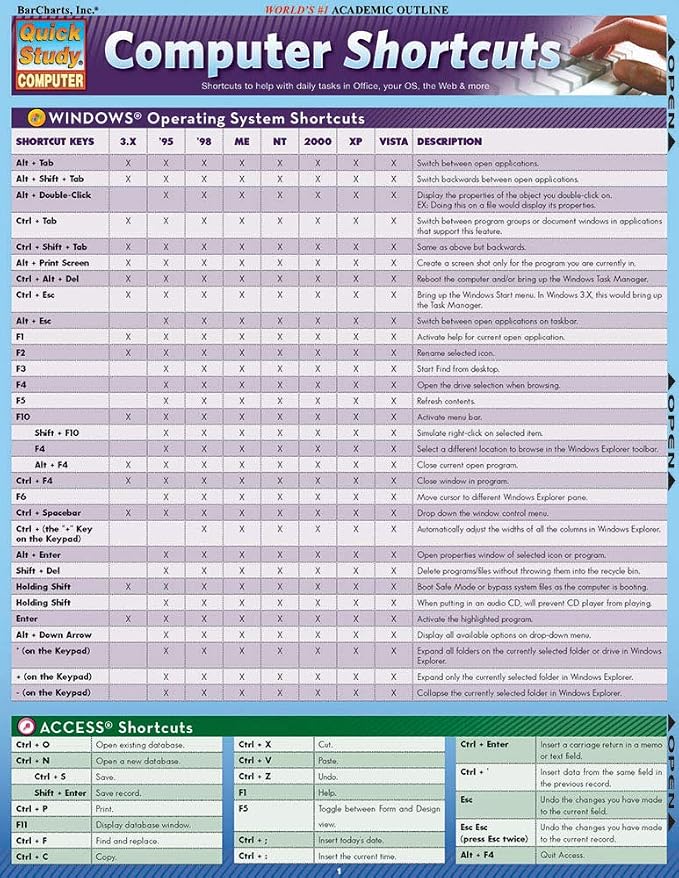
This 2-panel (4-page) guide points out helpful shortcuts that can be found within the most popular Windows PC and Apple Macintosh software.

Hurtig
levering

Gratis
returnering*

Sikker emballering

100 % originale produkter'

PCI DSS Compliance

ISO 27001 Certified



Note: Step Down Voltage Transformer required for using electronics products of US store (110-120). Recommended power converters Køb nu.


Hvad der skiller sig ud
Comprehensive Coverage
This guide includes an extensive list of computer shortcuts across various software, making it an essential tool for improving productivity and efficiency in both personal and professional settings.
Durable Material
Made from high-quality laminated material, this reference guide is resistant to wear and tear, ensuring longevity and protection against spills and stains for repeated use in busy environments.
Portable Design
The compact pamphlet format allows for easy transportation, making it convenient to reference while working on-the-go, ideal for students, professionals, or anyone looking to boost their computer skills.
Produktdetaljer
- 2-panel (4-page) guide for saving time while using Windows PC and Apple Macintosh software
- Points out helpful shortcuts for Windows Operating System, Access, FrontPage, PowerPoint, Publisher, QuarkXPress, InDesign, Quicken, UNIX/Linux, Internet Explorer, Mozilla Firefox, Opera, Apple Macintosh
- Includes special character shortcuts for word processing
- Useful for surfing the Web and balancing virtual checkbooks
- Published in September 2008
- Part of the Quick Study Computer Misc. Supplies series
Product Technical Details
| Manufacturer | QuickStudy |
| Brand | QuickStudy |
| Item Weight | 1.44 ounces |
| Product Dimensions | 8.5 x 0.06 x 11 inches |
| Number of Items | 1 |
| Manufacturer Part Number | 9781423205432 |
Hvem bør købe?

-
Students
Helpful for students learning computer software, providing quick reference to essential shortcuts for efficient study.
-
Office Workers
Ideal for office professionals needing quick access to keyboard shortcuts to enhance productivity and streamline tasks.
-
Beginner Users
Great for newcomers to computers, helping them quickly learn and memorize essential shortcut keys for various applications.

-
Advanced Users
Not suitable for advanced users who already know shortcuts, may find it too basic and lacking in depth.
Produktbeskrivelse
Har du spørgsmål? Chat med os
Kundespørgsmål og svar
-
spørgsmål:
What are the benefits of using computer shortcuts?
svar: Utilizing computer shortcuts significantly enhances your efficiency and productivity while working. Instead of navigating through multiple menus, you can execute commands with a simple keyboard combination, saving you time and effort. For instance, using 'Ctrl+C' to copy and 'Ctrl+V' to paste can streamline your workflow drastically. This is particularly useful for professionals who work with large datasets or need to manage numerous documents simultaneously. -
spørgsmål:
How can I learn computer shortcuts quickly?
svar: Learning computer shortcuts can be done effectively through repeated practice and utilizing cheat sheets. A Quick Study guide can provide you with a comprehensive list of the most essential shortcuts tailored to your operating system. Regularly referencing these shortcuts while you work will help commit them to memory. For example, practicing the shortcuts for document formatting in word processors can vastly improve your document creation speed. -
spørgsmål:
Are computer shortcuts the same across different platforms?
svar: No, computer shortcuts can vary significantly between operating systems and applications. For instance, 'Ctrl+Z' undoes an action on Windows, while 'Command+Z' does the same on macOS. Familiarizing yourself with the shortcuts specific to your frequently used software will enhance your effectiveness. This can have a major impact on your productivity, especially if you work in a mixed-platform environment. -
spørgsmål:
Which computer shortcuts are most useful for office work?
svar: Some of the most useful shortcuts for office work include 'Ctrl+S' for saving documents, 'Alt+Tab' for switching between open applications, and 'Ctrl+A' to select all text. Knowing these shortcuts can accelerate your workflow and reduce the time spent on repetitive tasks. For instance, if your job involves frequent file management, mastering these shortcuts will make navigating between documents more efficient. -
spørgsmål:
How do I customize keyboard shortcuts on my computer?
svar: Customizing keyboard shortcuts can usually be done through the settings or preferences menu of most software applications. This feature allows you to set your own combinations for specific tasks. For example, if you use certain commands frequently, personalizing shortcuts can enhance your workflow. A graphic designer might customize shortcuts in design software to speed up their creative process. -
spørgsmål:
Can computer shortcuts help with accessibility?
svar: Absolutely, computer shortcuts can greatly improve accessibility for users with disabilities. Many shortcuts are designed to reduce reliance on a mouse, enabling users to navigate and interact with software more easily. For individuals with mobility restrictions, utilizing keyboard shortcuts can facilitate smoother operation of their devices, making technology more inclusive and user-friendly. -
spørgsmål:
How do I remember computer shortcuts longer-term?
svar: To retain computer shortcuts long-term, consistent usage is key. Incorporating these shortcuts into your daily workflow will help embed them in your memory. Using mnemonic devices can also aid memorization. For instance, you might associate 'Ctrl+P' with 'Print' because both words start with 'P'. Regular practice in relevant contexts, like document creation, will reinforce your memory effectively. -
spørgsmål:
Where can I find a comprehensive list of computer shortcuts?
svar: A Quick Study guide is an excellent resource for finding a comprehensive list of computer shortcuts. It condenses essential information into an easy-to-reference format, making it a perfect learning tool for users of all skill levels. Utilizing such a guide can help you quickly identify the most relevant shortcuts for your needs, enhancing your productivity during tasks. -
spørgsmål:
How do different software applications utilize shortcuts?
svar: Different software applications have unique sets of shortcuts tailored to their functionalities. For example, word processors have shortcuts geared towards text formatting, while spreadsheet programs focus on data manipulation. Familiarizing yourself with these specialized shortcuts can help maximize your efficiency. In a data analysis role, knowing the shortcuts for navigating and manipulating data in spreadsheets can significantly speed up your analysis tasks. -
spørgsmål:
Where can I buy Computer Shortcuts Quick Study Computer Misc. Supplies?
svar: You can purchase the Computer Shortcuts Quick Study guide from Ubuy in Greenland. Ubuy offers a variety of educational resources, including this guide, which is designed to help you enhance your computer skills by providing a concise summary of essential shortcuts.
QuickStudy Templates Editorial Review
Customer reviews for the Computer Shortcuts Quick Study Computer Misc. Supplies are mixed. While some customers find it to be a very useful and affordable product with good information, others find it to be outdated and not helpful at all. It is worth noting that some reviews mention that the product was last updated for windows VISTA 2007, which makes it quite old. However, others appreciate the convenient shortcut collection and find it handy to keep nearby. Overall, if you have an older Windows operating system and are looking for a quick reference guide to computer shortcuts, this product may be worth checking out. However, if you have a more recent operating system, it is probably best to find a more up-to-date resource.
Kundeanmeldelser & vurderinger
236 kundebedømmelser
-
5 stjerne
76%
-
4 stjerne
13%
-
3 stjerne
8%
-
2 stjerne
0%
-
1 stjerne
3%
Anmeld dette produkt
Del dine tanker med andre kunder
Fordele
- Very affordable
- Convenient shortcut collection
- Handy to keep nearby
- Good information for study
Ulemper
- Outdated for newer Windows operating systems
Platformstillid & Køberens Tillid

JK
Jasmin
Verificeret køber
“Great products and very good service: very easy and very fast international delivery.”
9 September 2026 · via Trustpilot
AG
Anke
Verificeret køber
“Wonderful online shopping experience, smooth transaction from the start. Payment method works conveniently and delivery is unexpectedly fast and reliable. You go the extra mile for service. What makes this even more amazing, you deliver to Namibia. I will remain a happy Ubuy customer and will increase my purchases for sure! Thank you!”
10 September 2026 · via Trustpilot
H
Hazel
Verificeret køber
“Very easy to find the products what you need, and so fast delivery, that’s why I highly recommended to others costumers to used ubuy.”
10 September 2026 · via Trustpilot
O
Opaleye
Verificeret køber
“I received exactly what I ordered I was skeptical about your site because that was my first time to order. But the order came timely and neatly packaged. I was not disappointed. Thank you.”
11 September 2026 · via Trustpilot
AC
Adele
Verificeret køber
“Easy to find and order what you want on the website. Delivery is quick to the UK”
8 September 2026 · via Trustpilot
Sikker betaling
Global levering
Nem returnering
Originale produkter
Produktets prishistorik
Vigtig information
- Begrænsninger: For produkter, der forsendes internationalt, bemærk venligst, at eventuel producentgaranti muligvis ikke er gyldig; producentens serviceordninger er muligvis ikke tilgængelige; produktmanualer, instruktioner og sikkerhedsadvarsler er muligvis ikke på destinationslandets sprog; produkterne (og det medfølgende materiale) er muligvis ikke designet i overensstemmelse med destinationslandets standarder, specifikationer og mærkningskrav; og produkterne opfylder muligvis ikke destinationslandets krav til spænding og andre elektriske standarder (hvilket kan kræve brug af en adapter eller transformer, hvis relevant). Modtageren er ansvarlig for at sikre, at produktet lovligt kan importeres til destinationslandet. Ved bestilling hos Ubuy eller dets datterselskaber er modtageren importøren og skal overholde alle love og regler i destinationslandet.
- Det er ikke alle de produkter som vises på Ubuy som er til salg, idet Ubuy er en global søgemaskine. Produkterne er underlagt eksport-/handelsregler.
DKK 124
Bestil nu og få den omkring Torsdag, Oktober 15
Dette produkt er ikke begrænset i mit land. (Klik venligst på linket ovenfor, hvis dette produkt ikke er begrænset i dit land, så vil vores team gennemgå det og godkende det.)
QTY:
Kun 5 varer tilbage på lageret.
Sikker transaktion
PCI DSS-kompatibel og ISO 27001:2022-certificeret, med krypteret betaling og fuld køberbeskyttelse på hver ordre
Vores bedste logistikpartnere
Hurtigste grænseoverskridende levering
Egenskaber og fordele
- Find helpful shortcuts for the most popular Windows PC and Apple Macintosh software
- Saves time while surfing the web or balancing a virtual checkbook
- Includes special character shortcuts for word processing.
Ubuy-garanti
Oplev bekymringsfri shopping med 100 % originale produkter, PCI DSS-kompatibel betalingssikkerhed, ISO 27001-certificeret databeskyttelse, den hurtigste grænseoverskridende levering, gratis returnering* og sikker emballage på hver ordre.